Keep Google Photos until Immich shows the same pictures. The import test on this host did not use a real Google Takeout. It used a sample tree: three gray test JPEGs and three .json sidecars, built on the server and uploaded with the Immich HTTP API.
Every file in the screenshots below is a sample. The JPEGs are flat gray test images (800×600), not photos from a Google account. There is no Google Takeout screenshot in this post.
The Immich server is the one from Minimal Immich Install on Ubuntu (No ML) with Our Compose Generator.
1. Create a real Takeout (Photos only)
Do this yourself at https://takeout.google.com while signed in to the account that holds the library. This trial did not open that site, so the clicks are described here and not shown.
- Open Takeout and choose Deselect all.
- Select Google Photos only. Leave Drive, Mail, and every other product off.
- Open the album selector. It starts with all albums. Keep every album you intend to move, or leave all of them if the whole library should move.
- Continue. Use one archive type for the whole export (
.zipor.tgz, not a mix) and a part size you can download. - Create the export. Download every part. A missing part is a missing slice of the library.
Leave the Google Photos library in the account until you have checked counts and a few dates inside Immich.
2. What we actually uploaded (sample)
The sample lived at ~/takeout-sample/Takeout/Google Photos/Photos from 2024/:
| File | Sidecar photoTakenTime | EXIF DateTime | Pixels |
|---|---|---|---|
IMG_20240115_120000.jpg | 1705320000 → 2024-01-15T12:00:00.000Z | 2024:01:15 12:00:00 | 800×600 |
IMG_20240602_083000.jpg | 1717317000 → 2024-06-02T08:30:00.000Z | 2024:06:02 08:30:00 | 800×600 |
IMG_20241120_193000.jpg | 1732131000 → 2024-11-20T19:30:00.000Z | 2024:11:20 19:30:00 | 800×600 |
Each JPEG is 8.2K. Each .json sidecar is 618 bytes. The pixels came from the existing 1×1 blog-smoke.jpg test file, resized with Pillow into three gray frames (shades 128, 139, and 150) so the checksums differ. Immich dedupes identical files. These are test grays, not a camera roll. geoData in the sample sidecar is all zeros.
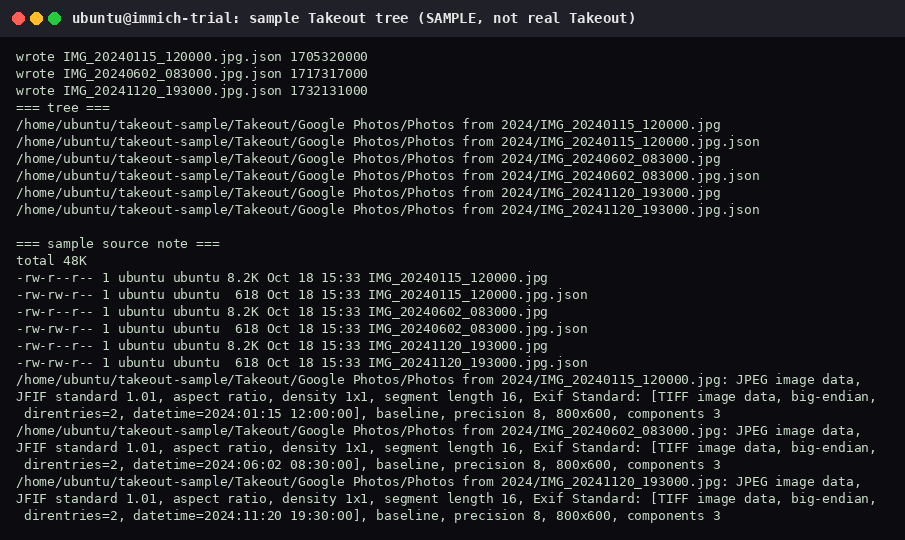
One sidecar, IMG_20240115_120000.jpg.json, is the shape we read. The description field says it is a sample:
{
  "title": "IMG_20240115_120000.jpg",
  "description": "SAMPLE sidecar for import mechanics (gray test image, not a real user photo)",
  "photoTakenTime": {
    "timestamp": "1705320000",
    "formatted": "Jan 15, 2024, 12:00:00 PM UTC"
  }
}
3. Plain upload does not read the sidecar
Immich’s docs tell you to use the community tool immich-go for a real Takeout. From the command-line interface page: if you are importing a Google Photos takeout, use immich-go. The quick start says the same thing for photos that are not already on your phone.
The command those docs point at is:
immich-go upload from-google-photos --server=<url> --api-key=KEY takeout-*.zipThat command is what reads Takeout .json sidecars (photo time, albums, people). --dry-run is available. Keep every archive part, and do not mix .zip parts with .tgz parts. immich-go was not installed on this host, and this post does not claim it was tested.
A plain API or CLI upload does not parse those .json files. The official CLI (immich upload --recursive, after immich login) hashes files and the server dedupes by hash. It still does not apply photoTakenTime from a sidecar unless you pass the dates yourself. We did not run that CLI upload.
The server image already contains CLI v3.3.3 at /usr/src/app/cli/bin/immich, and immich-admin at /usr/src/app/server/bin/immich-admin. Nothing was installed with npm. The CLI wants an API key and files visible inside the container, so the sample import used the HTTP API from the host instead. For each sample file we read photoTakenTime.timestamp from the sidecar, turned it into ISO-8601, and sent that string as fileCreatedAt and fileModifiedAt.
4. Upload the three sample JPEGs
The demo admin was blog-demo@immichcompare.local (isAdmin, storage label admin). The password was not in the notes, so it was reset inside the container:
sudo docker exec -it immich_server \
  /usr/src/app/server/bin/immich-admin reset-admin-password
A non-interactive first try sat on the prompt and was killed. A pty session answered the prompts (RESET_SENT=2, exit 0). The temporary password existed only in that SSH session. It is not in the screenshot and it is not written here. shouldChangePassword was already true. Reset it again before anyone else uses the admin account.
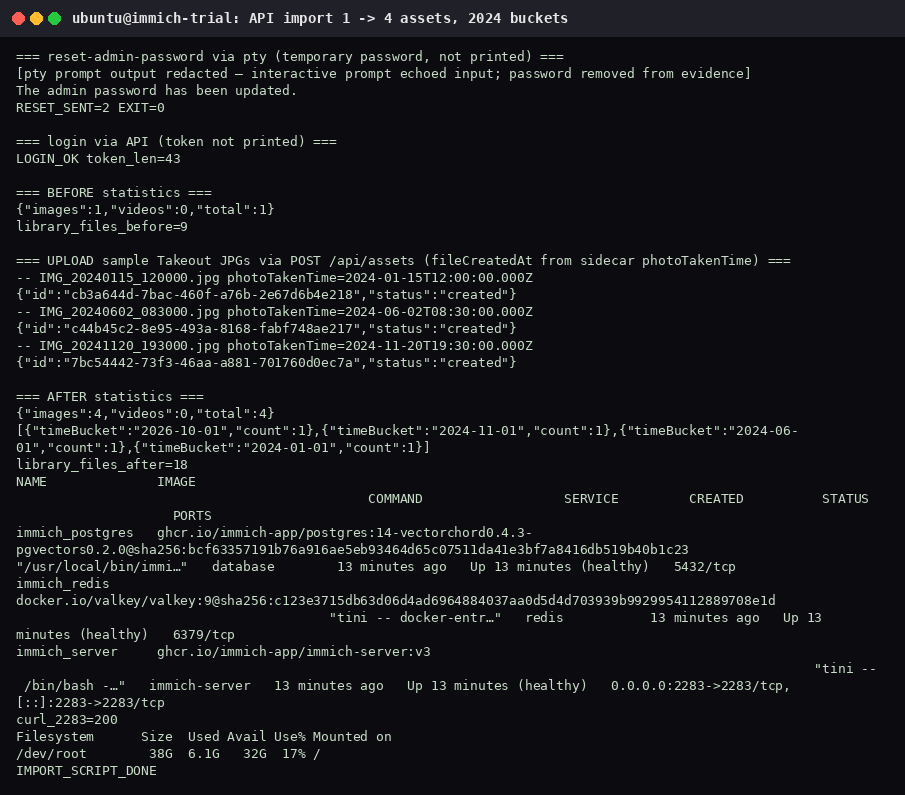
API login returned a bearer token (length 43). The token is not printed. Each sample file was then posted. Repeat the same form for the June and November files, with their own sidecar timestamps:
curl -X POST http://127.0.0.1:2283/api/assets \
  -H "Authorization: Bearer <token>" \
  -F assetData=@IMG_20240115_120000.jpg \
  -F deviceAssetId=IMG_20240115_120000.jpg \
  -F deviceId=blog6-takeout-sample \
  -F fileCreatedAt=2024-01-15T12:00:00.000Z \
  -F fileModifiedAt=2024-01-15T12:00:00.000Z \
-F isFavorite=false| File | fileCreatedAt sent | API result |
|---|---|---|
IMG_20240115_120000.jpg | 2024-01-15T12:00:00.000Z | created, id cb3a644d-7bac-460f-a76b-2e67d6b4e218 |
IMG_20240602_083000.jpg | 2024-06-02T08:30:00.000Z | created, id c44b45c2-8e95-493a-8168-fabf748ae217 |
IMG_20241120_193000.jpg | 2024-11-20T19:30:00.000Z | created, id 7bc54442-73f3-46aa-a881-701760d0ec7a |
5. What changed on the server
GET /api/assets/statistics before the three uploads: {"images":1,"videos":0,"total":1} and 9 files under the library. That one image was the earlier gray test upload.
After the three sample uploads: {"images":4,"videos":0,"total":4} and 18 library files. Time buckets were 2026-10-01 (1, the original test image), 2024-11-01 (1), 2024-06-01 (1), and 2024-01-01 (1). The sidecar dates are what landed in those 2024 buckets, because the request set fileCreatedAt. The API did not discover them by reading the .json files on its own.
docker compose ps showed immich_postgres, immich_redis, and immich_server healthy. curl to :2283 returned 200. df on / was 38G size, 6.1G used, 32G available, 17%.
6. Before you delete anything at Google
- For a real export, use
immich-go upload from-google-photoson the Takeout archives. We did not run that tool. Try--dry-run, then a small album, before the rest of the library. - If you use
POST /api/assetsorimmich uploadinstead, pass dates yourself. Those clients will not apply the sidecar JSON for you. - Compare Immich’s image count with the Takeout, and open the months you expect to see.
- Keep the Google Photos library until that check is done.