Move UPLOAD_LOCATION when the library disk fills up. Move photos and videos only. Leave Postgres on a local disk. This host started with UPLOAD_LOCATION=./library on the root volume, copied 18 files to a new 20G disk, and still had 4 assets afterward.
Check the device and the byte size twice before mkfs. Formatting the root disk destroys the server. Never put Postgres on NFS.
If you generate a new env file at https://immichcompare.pages.dev, merge UPLOAD_LOCATION yourself so the download does not point the stack back at ./library.
1. Look at the disks before you format anything
On this host the root disk was /dev/nvme0n1 (40G, EBS volume vol-079c4217cd7a9acc4). The new disk was a 20G gp3 volume, vol-0084a68d8dd9eb576, created in ap-southeast-1a, tagged Name=immich-trial-blog4-temp, and attached as /dev/sdf. The guest showed it as /dev/nvme1n1.
lsblk -o NAME,SIZE,TYPE,MOUNTPOINT,FSTYPE
df -h
lsblk -b -o NAME,SIZE,TYPE
Before the format:
| Device | Size | Mount |
|---|---|---|
/dev/nvme0n1 | 40G (42949672960 bytes) | root disk, do not format |
/dev/nvme0n1p1 | 39G | / (ext4) |
/dev/nvme1n1 | 20G (21474836480 bytes) | empty, the new disk |
df -h on / showed 38G size, 6.1G used, 32G available, 17%.
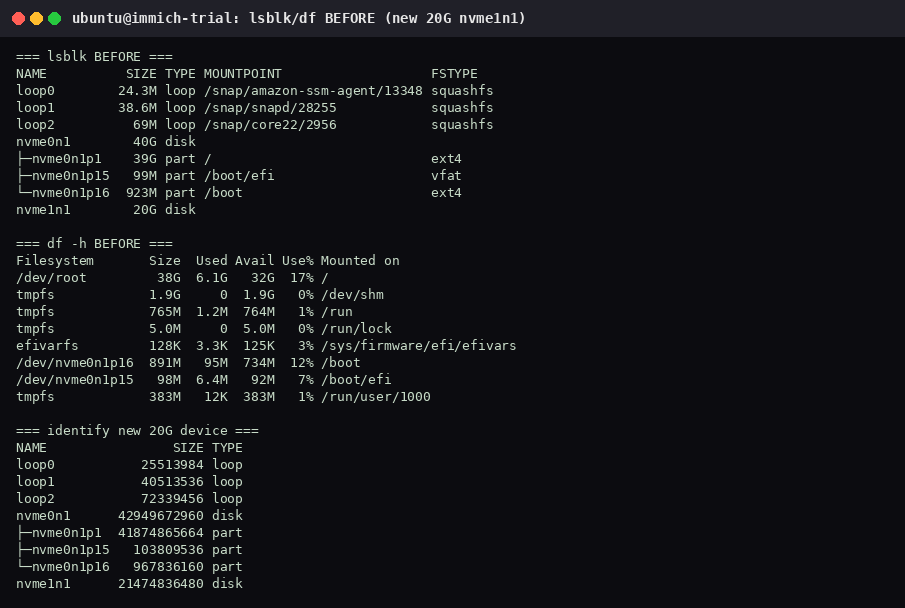
Stop if the target size is not 21474836480 on your box, or if your empty disk has a different name. The AWS device name /dev/sdf was not the node mkfs used.
2. Partition, format, and mount the new disk
Use parted to write a GPT label and a single partition on the new disk only. On this host that partition showed up as /dev/nvme1n1p1. Confirm the name with lsblk before mkfs:
sudo parted -s /dev/nvme1n1 mklabel gpt mkpart primary ext4 0% 100%
lsblk -o NAME,SIZE,TYPE /dev/nvme1n1
sudo mkfs.ext4 /dev/nvme1n1p1
sudo mkdir -p /mnt/immich-library-new
sudo mount /dev/nvme1n1p1 /mnt/immich-library-new
lsblk -o NAME,SIZE,TYPE,MOUNTPOINT,FSTYPE
df -h / /mnt/immich-library-new
mkfs reported a filesystem UUID of 919a658c-09cb-473f-933b-1017c76e50b0 and 5242368 4k blocks. After the mount, nvme1n1p1 was ext4 on /mnt/immich-library-new. df showed 20G size, 24K used, 19G available, 1%. Root was still 38G with 6.1G used.
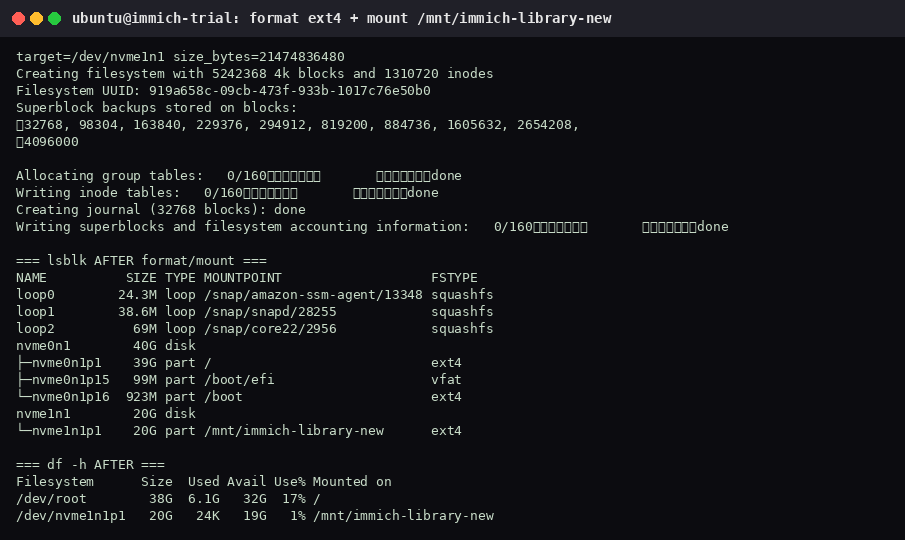
If you are keeping the disk, mount it by that UUID from /etc/fstab only after the copy checks out. This trial did not keep the volume, so it did not leave an fstab entry behind.
3. Stop Immich, copy the library, then change one env line
Record the live numbers first. On this host, before the move: curl to :2283 returned 200, the asset table had 4 rows, library held 18 files and 252K, and UPLOAD_LOCATION=./library. Postgres and .env stayed on the root disk for the whole move.
Stop the stack so the copy is quiet. rsync -a keeps permissions and does not follow the trailing slash into a nested directory:
cd ~/immich-app
docker compose down
rsync -a library/ /mnt/immich-library-new/
cp .env .env.blog4-bak
sed -i 's|^UPLOAD_LOCATION=.*|UPLOAD_LOCATION=/mnt/immich-library-new|' .env
grep '^UPLOAD_LOCATION=' .env
docker compose up -d
The copy finished with 18 files and 268K on /mnt/immich-library-new. grep showed UPLOAD_LOCATION=/mnt/immich-library-new.
Immediately after up -d, curl returned 000. Postgres was healthy, and Redis and immich_server were still health: starting (about 8 seconds old). Wait, then check again. A 000 here means the server was not listening yet.
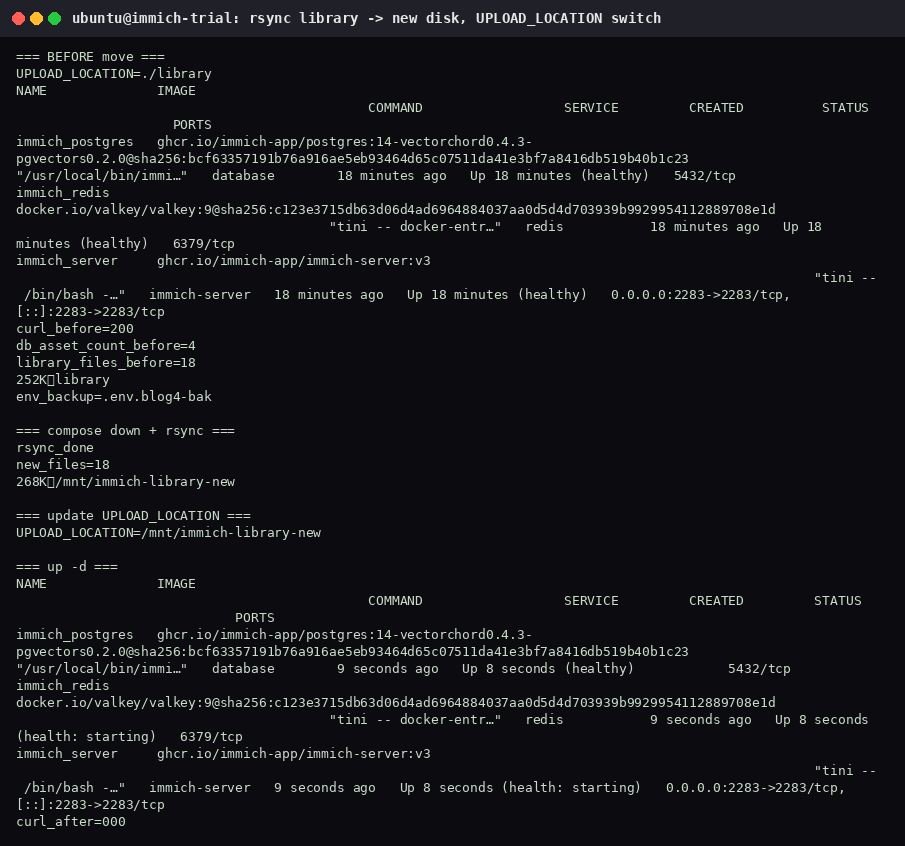
Inside the container the library is still /data. Asset paths stored in Postgres do not change when only the host side of UPLOAD_LOCATION changes. That is why the row count survives.
4. Verify the library on the new disk
curl -sI http://127.0.0.1:2283
# asset row count, same query as before the move
find /mnt/immich-library-new -type f | wc -l
df -h /mnt/immich-library-new
docker compose logs --tail=20 immich-server
On the next check, curl returned 200, the asset table still had 4 rows, the mount still had 18 files, and UPLOAD_LOCATION was /mnt/immich-library-new. Redis and immich_server were still health: starting at 21 seconds; HTTP 200 arrived before Docker marked them healthy. df showed 272K used and 19G available on /dev/nvme1n1p1. The microservices log line was Nest application successfully started (18 Oct 2026, 11:41:02 PM).
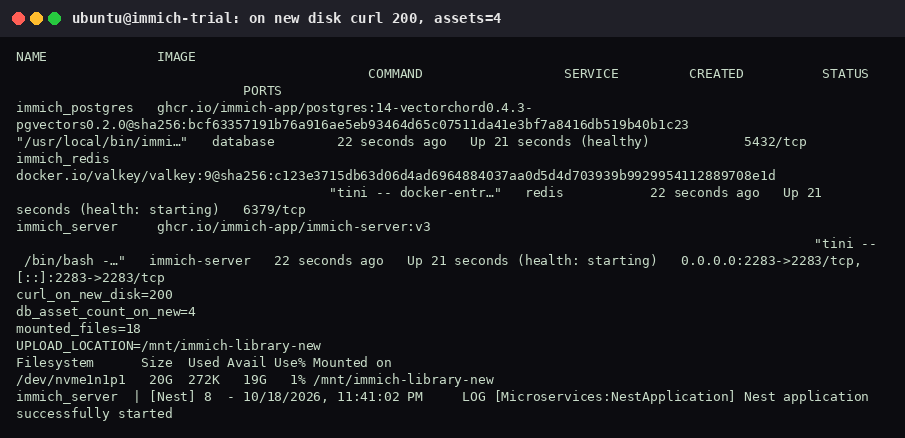
Postgres (./postgres on the root disk) was not part of the rsync. Moving UPLOAD_LOCATION makes room for photos and videos. It is not a backup. Keep a separate copy of the library and the database before you rely on the new disk.
5. What this trial did afterward
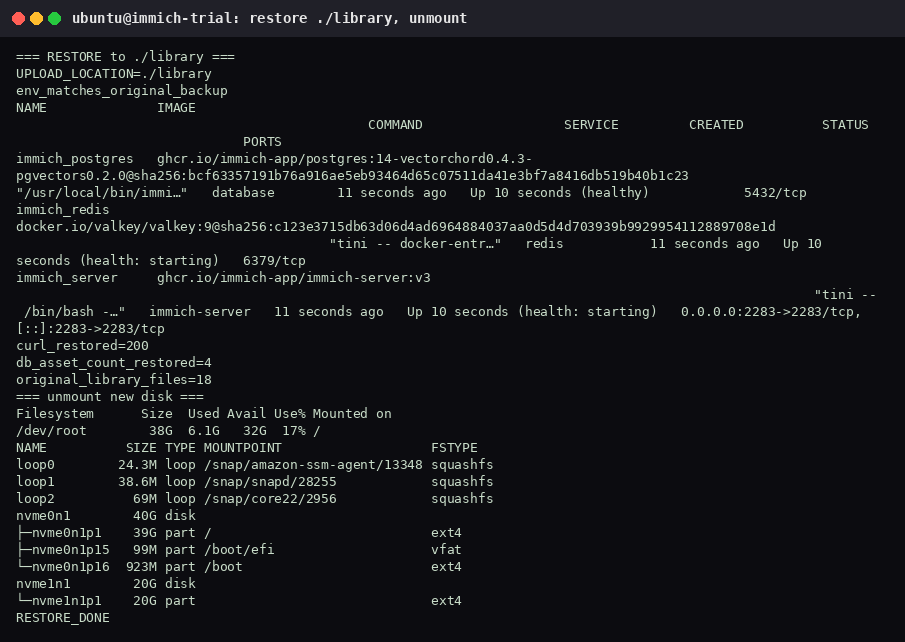
The 20G volume was only for the drill. After the checks, the stack was stopped, UPLOAD_LOCATION was set back to ./library, and that .env matched .env.blog4-bak. docker compose up -d then returned curl 200, asset count 4, and 18 files in the original library. The new disk was unmounted. Root df was unchanged: 38G, 6.1G used, 32G free, 17%.
Detaching the volume does not stop billing. Deleting it does. This trial detached vol-0084a68d8dd9eb576, waited until it was available, and deleted it. A later describe returned InvalidVolume.NotFound, and no volume was left with the temp tag. The root volume was not deleted. A 20GB gp3 volume in Singapore was about $0.096 per GB-month; this one lived under an hour, so the cost was under $0.03.
Checks before you walk away
- The
mkfstarget’slsblk -bsize matched the empty disk, not the root disk. - The stack was down during
rsync. - File count and asset count matched the numbers you wrote down before the move.
DB_DATA_LOCATIONis still a local path. Do not point Postgres at this mount, and do not put it on NFS.