Put HTTPS in front of the Immich server from Minimal Immich Install on Ubuntu (No ML) with Our Compose Generator. Immich stays on 127.0.0.1:2283. Caddy is the path this host actually ran. The Nginx block at the end was not installed here.
tls internal is a local certificate for the name localhost. Point the site block at a real domain and remove tls internal when you want Caddy to fetch a public certificate on its own.
This host’s security group did not open ports 80 or 443 to the world. Check the proxy with on-host curl, or with an SSH forward, until you mean for 443 to be public.
1. Install Caddy
Install Caddy from the official Cloudsmith stable apt repo (dl.cloudsmith.io, caddy/stable):
sudo apt-get install caddy
caddy version
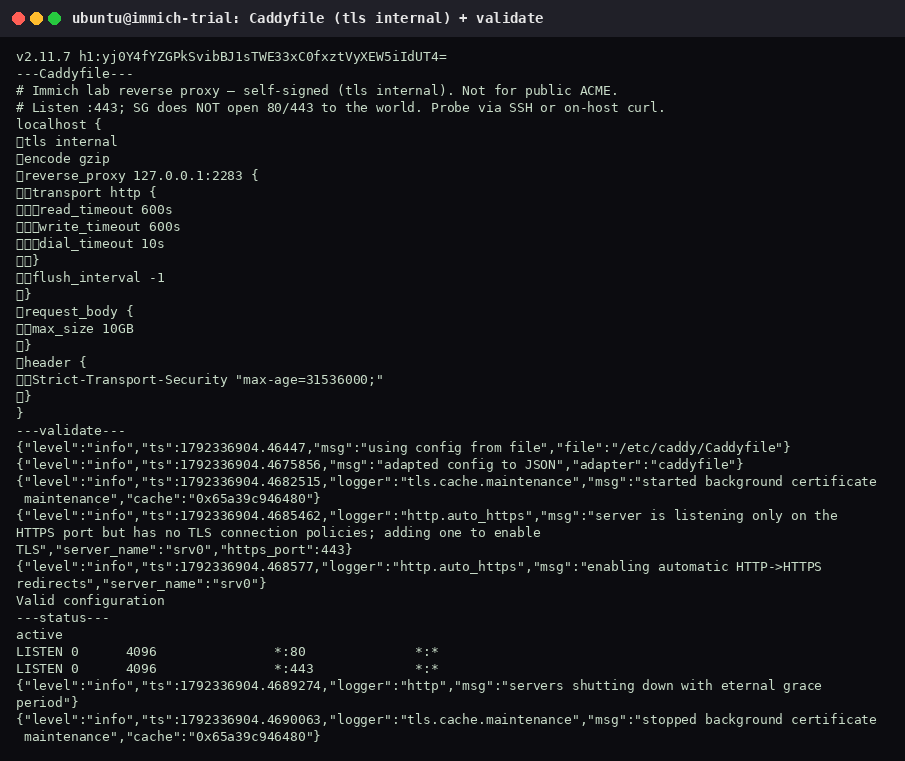
This host reported v2.11.7 h1:yj0Y4fYZGPkSvibBJ1sTWE33xC0fxztVyXEW5iIdUT4=.
2. Write the Caddyfile
Save this as /etc/caddy/Caddyfile. It proxies to Immich, allows a 10GB body, and keeps the proxy timeouts long enough for a large upload:
# Immich lab reverse proxy — self-signed (tls internal). Not for public ACME.
# Listen :443; SG does NOT open 80/443 to the world. Probe via SSH or on-host curl.
localhost {
	tls internal
	encode gzip
	reverse_proxy 127.0.0.1:2283 {
		transport http {
			read_timeout 600s
			write_timeout 600s
			dial_timeout 10s
		}
		flush_interval -1
	}
	request_body {
		max_size 10GB
	}
	header {
		Strict-Transport-Security "max-age=31536000;"
	}
}
SG in that comment is the cloud security group. flush_interval -1 leaves streaming responses alone. The header line is HSTS for one year. Fine for a localhost lab. Think before you copy that header onto a name you still open over plain HTTP.
A first draft used :443 as the site address with tls internal. https://127.0.0.1/ then failed with a TLS alert. The working file uses the site address localhost, and Caddy issued a certificate for that name.
3. Validate and start
sudo caddy validate --config /etc/caddy/Caddyfile
sudo systemctl enable --now caddy
sudo systemctl restart caddy
sudo systemctl reload caddy
systemctl is-active caddy
caddy validate printed Valid configuration. systemctl reported active. Caddy listened on *:80 and *:443.
4. Prove the proxy reaches Immich
curl -Ik https://localhost/
curl -Ik https://127.0.0.1/
curl -sI http://127.0.0.1:2283
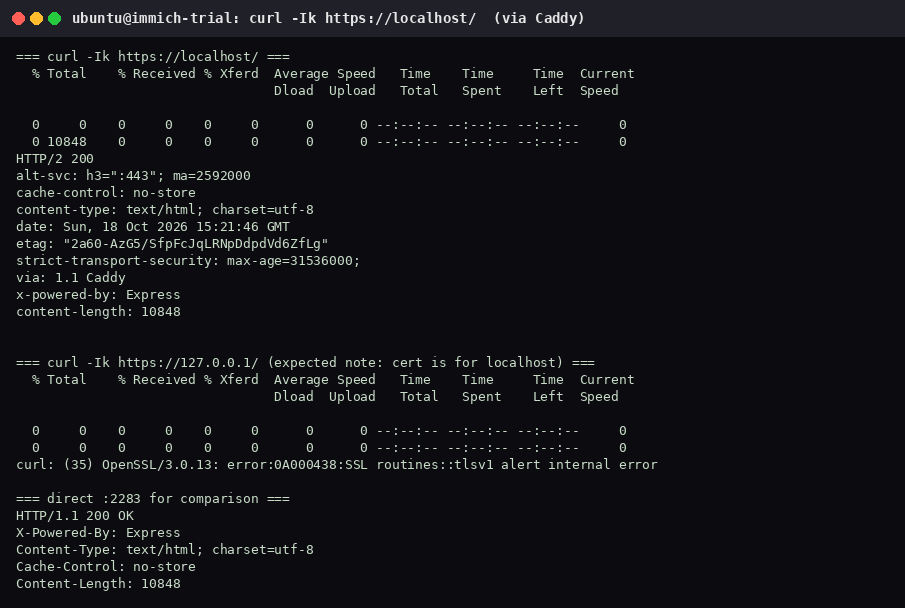
https://localhost/ returned HTTP/2 200, via: 1.1 Caddy, strict-transport-security: max-age=31536000;, and content-length: 10848 (18 Oct 2026, 15:21:46 GMT). Direct http://127.0.0.1:2283 also returned HTTP/1.1 200 with the same content length.
https://127.0.0.1/ failed, and that is expected. The certificate is for localhost, not for the IP:
curl: (35) OpenSSL/3.0.13: error:0A000438:SSL routines::tlsv1 alert internal errorOpen https://localhost/. The browser will warn on this internal certificate. That warning goes away after you switch the site address to a real domain and let Caddy obtain a public certificate.
If port 443 is not reachable from your laptop, forward it and open the forwarded port on localhost so the certificate name matches:
ssh -L 8443:127.0.0.1:443 user@your-hostThen browse to https://localhost:8443/.
5. Set the external URL
When the proxy returns 200 for the hostname you will actually use, sign in as an admin and open Admin → Settings. Set the external URL to that HTTPS origin, such as https://immich.example.com, so Immich builds links with the public address.
This trial did not capture that settings screen. There is no screenshot for this step.
6. Stop publishing port 2283
After https://localhost/ (or your real name) returns 200 through the proxy, Immich does not need a public :2283. Remove 2283 from the security group, or bind the compose port to loopback:
ports:
  - 127.0.0.1:2283:2283
This trial did not do that. docker compose ps on this host still showed 0.0.0.0:2283->2283/tcp. Do the bind only after the proxy check above succeeds. The security group on this host allowed specific /32 addresses, not 0.0.0.0/0, and it did not open 80 or 443 to the world.
For a real domain, replace localhost with that name and delete the tls internal line. Caddy then requests a public certificate automatically. Ports 80 and 443 have to be reachable for that. Do not open them to 0.0.0.0/0 until you intend the site to be public.
Nginx alternative (not installed here)
Use this only if you already run Nginx. It was not installed on the trial host. You must point ssl_certificate at a real certificate (Certbot or your lab cert). Keep the body limit at 10G and the timeouts at 600s, and proxy to the same loopback port:
server {
    listen 443 ssl;
    server_name immich.example.com;
    ssl_certificate     /etc/letsencrypt/live/immich.example.com/fullchain.pem;
    ssl_certificate_key /etc/letsencrypt/live/immich.example.com/privkey.pem;

    client_max_body_size 10G;
    proxy_read_timeout 600s;
    proxy_send_timeout 600s;
    send_timeout 600s;

    location / {
        proxy_pass http://127.0.0.1:2283;
        proxy_set_header Host $host;
        proxy_set_header X-Real-IP $remote_addr;
        proxy_set_header X-Forwarded-For $proxy_add_x_forwarded_for;
        proxy_set_header X-Forwarded-Proto $scheme;
        # WebSocket / realtime support (present in newer Immich):
        proxy_http_version 1.1;
        proxy_set_header Upgrade $http_upgrade;
        proxy_set_header Connection "upgrade";
    }
}
Do not expose 80 or 443 to 0.0.0.0/0 unless you intend public access.