Back up the library and the database, then pull. On this host the pull did not change anything: IMMICH_VERSION stayed v3, the server image id stayed bae7664ff3aa, and the log line stayed v3.3.3. Run the same steps when you do bump a pin. Read the release notes first. Do not jump a major version because a drill on v3 happened to be a no-op.
There is no newer version in this post. The trial was already on the v3 metatag, and docker compose pull did not fetch a new digest. Pin a specific v3.x.y release, and read its notes, before you change IMMICH_VERSION.
Official steps: Immich upgrading. The docs say to read breaking changes, update IMMICH_VERSION when the pin should move, then run docker compose pull && docker compose up -d. :v3 is a major metatag and does not follow release candidates. The mobile app is typically compatible with the current major and the one before it; the server expects the same major. Upgrade the phone app before a server major. Downgrading is not supported, even inside the same minor. The VectorChord migration section applies if you are not already on ghcr.io/immich-app/postgres. This host already uses ghcr.io/immich-app/postgres:14-vectorchord0.4.3-pgvectors0.2.0, so that section was not part of the drill.
Regenerating files at https://immichcompare.pages.dev is optional. Merge by hand. Do not let a new .env replace IMMICH_VERSION, UPLOAD_LOCATION, or the database password.
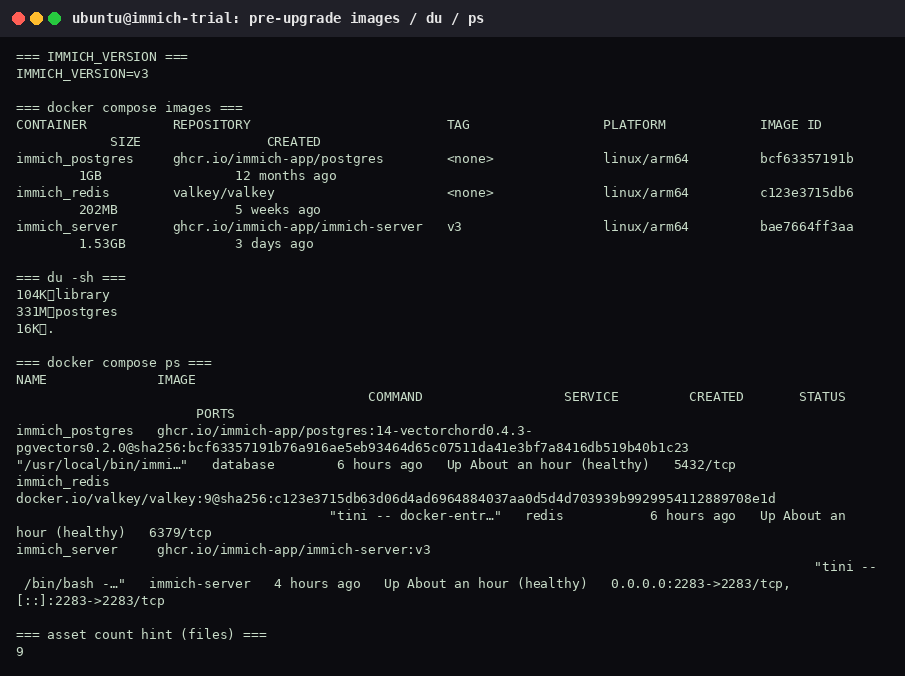
1. Write down the pin, the image ids, and the sizes
From ~/immich-app:
grep '^IMMICH_VERSION=' .env
sudo docker compose images
sudo docker compose ps
du -sh library postgres .
find library -type f | wc -l
This host, before the pull:
| What | Value |
|---|---|
IMMICH_VERSION | v3 |
immich_server | ghcr.io/immich-app/immich-server:v3, id bae7664ff3aa, linux/arm64, 1.53GB, created 3 days ago |
immich_postgres | id bcf63357191b, linux/arm64, 1GB, created 12 months ago |
immich_redis | valkey/valkey id c123e3715db6, linux/arm64, 202MB, created 5 weeks ago |
library | 104K, 9 files |
postgres | 331M |
| compose directory | 16K |
docker compose ps showed immich_postgres, immich_redis, and immich_server healthy. Server logs on this pin already said v3.3.3. There is no machine-learning container; that service is off, as in the minimal install.
2. Stop the stack and back up onto the host
Stop first so Postgres files are not changing under rsync. The backup on this host landed at /home/ubuntu/immich-backup-2026-10-18:
cd ~/immich-app
sudo docker compose down
BACKUP_DIR=$HOME/immich-backup-$(date +%F)
sudo rsync -a library postgres docker-compose.yml .env "$BACKUP_DIR/"
sudo du -sh "$BACKUP_DIR"
sudo docker compose up -d
rsync started at 2026-10-18T15:22:01+00:00 and reported 1,756 files (1,708 regular files, 48 directories), 345,989,760 bytes, and a destination size of 331M. The directory contained .env, docker-compose.yml, library, and postgres. The stack was started again at 2026-10-18T15:22:08+00:00.
That copy sits on the same disk as the live library. It is enough for a lab drill. A backup you would restore after disk loss has to live on another machine or another volume.
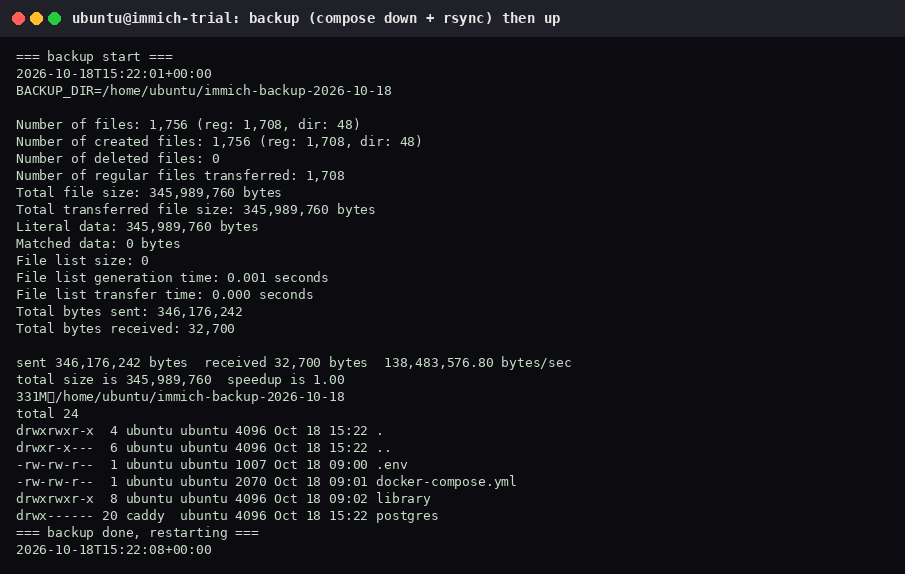
In this listing the postgres directory is owned by caddy. That is how the directory already appeared on the host. The drill did not chown it. rsync -a kept the owner it found.
3. Pull the pin you already have, then start
sudo docker compose pull && sudo docker compose up -d
sudo docker compose logs --tail=80 immich-server
sudo docker compose images
curl -sI http://127.0.0.1:2283
curl -Ik https://localhost/
find library -type f | wc -l
du -sh library postgres
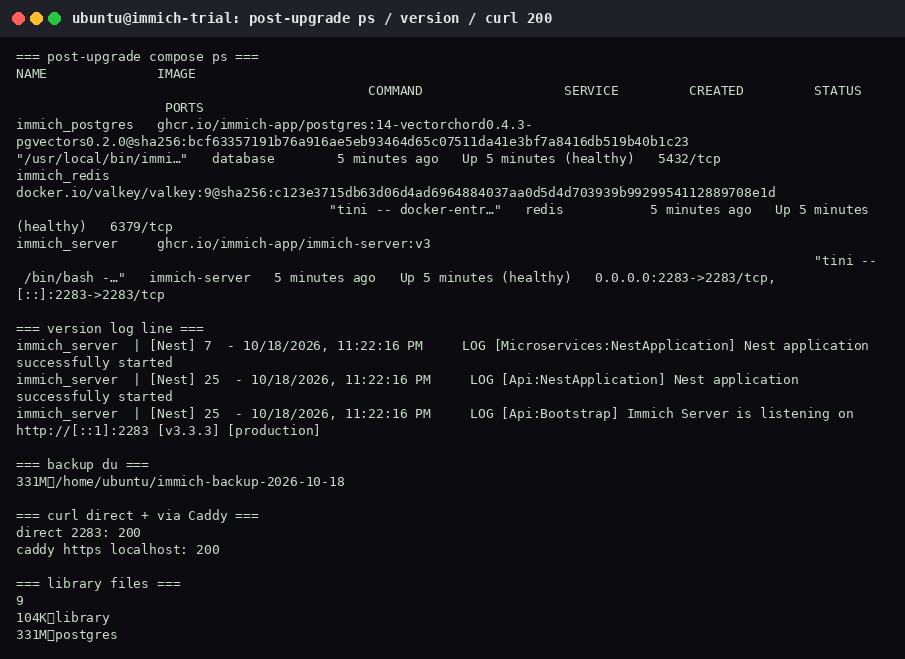
docker compose pull reported the image pulled. It did not download a new digest. IMMICH_VERSION was still v3, and the server image id was still bae7664ff3aa.
Logs after the restart (18 Oct 2026, 11:22:16 PM):
Nest application successfully started
Immich Server is listening on http://[::1]:2283 [v3.3.3] [production]
Both the microservices process and the API process logged a successful Nest start. docker compose ps showed all three services healthy. Direct :2283 returned 200. https://localhost/ through Caddy returned 200. The library still had 9 files and 104K. Postgres was still 331M. The backup directory was still 331M.
The docs also list docker image prune to drop old images after a real upgrade. This pull had nothing new to prune. Skip the prune until a pull actually replaces an image, and do not prune until the new stack is healthy.
4. When you do change the version
- Read the upgrading page and the breaking changes for the release you want.
- Set
IMMICH_VERSIONto that specific release tag (a fullv3.x.y, not only the floatingv3metatag). Stay on the same major unless you have read the major-upgrade notes and updated the mobile app first. - Run the backup in section 2 again.
- Run
sudo docker compose pull && sudo docker compose up -d. - Confirm a new image id, the version string in the log, HTTP 200, and the same library file count.
This trial did not perform step 2. Do not invent a destination version from the fact that v3.3.3 was already running.
5. Rollback plan
Immich does not support downgrades, including a downgrade inside the same minor. Rolling back means putting the stopped-stack backup back, not pulling an older tag and hoping the database schema rewinds.
This drill did not need a rollback, because the digest did not change. If a later bump fails, restore the backup you took in section 2:
cd ~/immich-app
sudo docker compose down
sudo mv library "library.failed.$(date +%F)"
sudo mv postgres "postgres.failed.$(date +%F)"
sudo cp .env ".env.failed.$(date +%F)"
sudo cp docker-compose.yml "docker-compose.yml.failed.$(date +%F)"
sudo rsync -a "$HOME/immich-backup-2026-10-18"/library \
  "$HOME/immich-backup-2026-10-18"/postgres \
  "$HOME/immich-backup-2026-10-18"/docker-compose.yml \
  "$HOME/immich-backup-2026-10-18"/.env .
sudo docker compose up -d
sudo docker compose logs --tail=80 immich-server
curl -sI http://127.0.0.1:2283
find library -type f | wc -l
Check the log for the version you backed up, HTTP 200, and the file count from before the bump. Delete the *.failed.* directories only after that check. Replace the backup path with the directory from the day you ran section 2.